
Growing teams face increasing complexity in tracking tasks, deadlines, and collaboration. Project management software offers a streamlined way to organize workflows and improve communication, reducing confusion and delays.
These tools provide clear visibility into project progress, assign responsibilities efficiently, and centralize documentation, which supports better decision-making as teams scale. By adopting project management software, teams can maintain structure and focus despite rapid growth.
The right software adapts to evolving needs without disrupting productivity. It helps teams avoid missed deadlines and overlapping efforts, making project management more predictable and manageable.
Why Growing Teams Need Project Management Software
Managing increasing workloads, communication, and coordination becomes essential as teams expand. Project management software provides practical solutions to maintain clarity, efficiency, and alignment across all team levels.
Challenges Faced by Expanding Teams
Growing teams face challenges like task duplication, unclear responsibilities, and slowed decision-making. Communication gaps increase as more team members join, often causing delays and misunderstandings.
Team leaders and project managers struggle to monitor progress and resource allocation efficiently. Without a centralized system, tracking deadlines and dependencies becomes complex.
These issues lead to decreased productivity and difficulty maintaining consistent project quality. The lack of visibility into individual and collective work creates bottlenecks.
How Project Management Software Addresses Growth
Project management software offers centralized platforms where all tasks, timelines, and updates are visible to every team member. This improves transparency and accountability.
Features like task assignment, status tracking, and document sharing reduce confusion and streamline workflows. Agile project management tools help teams adapt to shifting priorities quickly.
Automation of routine tasks, such as reminders and reporting, eases the project managers’ burden. It also allows team members to focus on their specific roles without overlapping efforts.
Aligning Project Goals and Team Objectives
Project management software ensures that project goals are clearly communicated and broken down into actionable tasks. This alignment helps team members understand their individual contributions to the broader objectives.
Team leaders can use dashboards and progress reports to monitor how well team activities match project targets. This visibility supports timely adjustments and resource reallocation.
Collaboration features enable continuous feedback, keeping team members engaged and focused. Clear alignment improves motivation and reduces risks related to missed deadlines or misaligned efforts.
Enhancing Team Collaboration and Communication
Project management software improves how teams work together by simplifying communication and organizing shared resources. It provides tools that ensure everyone stays informed and aligned, promoting efficient teamwork without confusion.
Centralized Collaboration Tools
Centralized collaboration tools bring all team interactions into a single platform. This means messages, task updates, and feedback are accessible to every member in real time. Users can comment directly on tasks or projects, reducing email clutter and fast-tracking decision-making.
Notifications and activity feeds keep the team aware of progress and roadblocks. These tools often include integrations with calendars and third-party apps, making it easier to manage deadlines and workflows. Centralized collaboration minimizes miscommunication and helps teams act quickly.
Streamlined Team Communication
Streamlined communication features such as instant messaging, video calls, and threaded discussions support clear and organized conversations. Teams avoid losing important information in long email chains by using dedicated channels for different topics or projects.
The software tracks message history and tags relevant members, ensuring transparency. Team members can quickly clarify issues or share updates, which enhances responsiveness. Clear communication through these tools reduces errors and improves accountability.
Shared Workspaces for Project Files
Shared workspaces allow teams to store, access, and manage project files in one secure location. Files are version-controlled and organized according to projects or tasks, removing confusion from scattered documents.
Team members can upload, comment, and edit files collaboratively, fostering teamwork. Permissions control who can view or modify content, maintaining data security. Centralized file sharing boosts productivity by keeping critical documents readily available to the entire team.
Optimizing Project Planning, Scheduling, and Execution
Effective project management software streamlines scheduling, task assignment, and workflow consistency. It supports growing teams by providing clear visibility into project timelines and daily responsibilities.
Task and Time Management Solutions
Project management software helps teams assign tasks clearly and track progress efficiently. Features like time tracking enable monitoring how long tasks take, which informs better workload distribution.
Most platforms offer customizable workflows and pre-built templates to fit various project types, reducing setup time. This flexibility lets teams adopt methods like Scrum or traditional task lists suited to their needs.
Automation alerts keep team members aware of deadlines, improving productivity. Time management is enhanced when individuals understand their responsibilities and can log hours directly within the tool.
Visual Planning with Gantt Charts and Kanban Boards
Visual tools such as Gantt charts provide a timeline view of project phases, dependencies, and milestones. This helps managers identify potential bottlenecks and adjust schedules proactively.
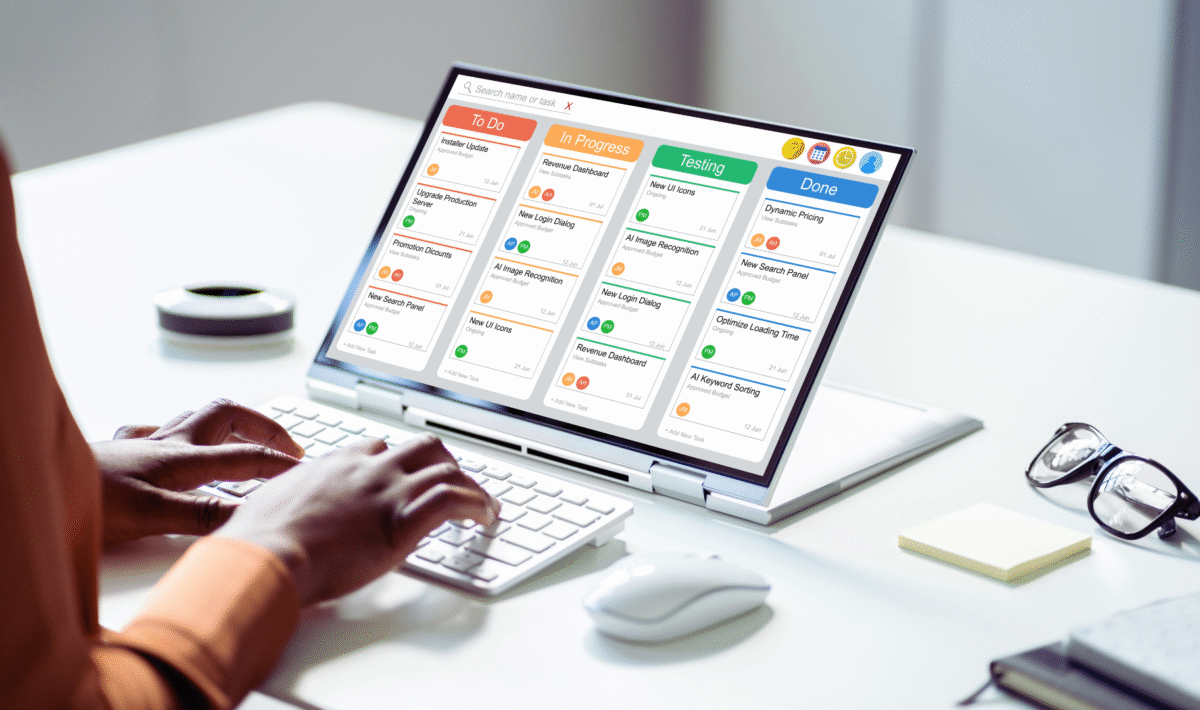
Kanban boards highlight work stages and task statuses with columns like To Do, In Progress, and Done. They improve workflow clarity by showing which tasks need attention and who is responsible.
Both Gantt charts and Kanban boards typically have a user-friendly interface that adapts to team preferences. These visual formats enable quick updates and foster better communication during project execution.
Standardization of Processes and Workflows
Project management software encourages the standardization of processes by implementing consistent workflows across projects. Teams benefit from replicating proven methods, which reduces errors and speeds up onboarding.
Consistency is maintained through customizable workflows and the use of pre-built templates tailored to industry or project demands. This ensures every project follows defined steps for task assignment and status updates.
Standardized processes improve reporting accuracy by unifying data collection on progress and time management. They also help teams scale as complexities increase, ensuring reliable project execution.
Improving Resource Management, Accountability, and Project Success
Effective management of resources, clear accountability, and insightful data analysis all contribute to smoother project execution and better outcomes. Streamlined tracking and risk handling are critical to maintaining control over timelines, budgets, and overall project delivery.
Efficient Resource Allocation and Tracking
Project management software enables teams to allocate resources based on availability, skill sets, and priorities. It provides a centralized view of who is working on what, reducing overbooking and idle time.
Resource allocation tools help managers balance workloads, preventing burnout and enhancing efficiency. Progress tracking features update in real time, allowing quick adjustments to keep the project on schedule.
This software supports tracking physical and digital assets, ensuring nothing is overlooked. It also maintains version control, so the team uses the most current files and data, preventing errors caused by outdated information.
Accountability and Progress Transparency
Clear assignment of tasks through project management software increases individual accountability. Each team member’s responsibilities are documented and monitored, which helps identify delays early.
Progress tracking dashboards display the real-time status of tasks and milestones. This creates transparency among team members and stakeholders, making it easier to address bottlenecks.
Activity logs and time tracking provide measurable data on effort and productivity. This information supports performance reviews and encourages timely task completion.
Customizable Reporting and Data-Driven Insights
Customizable reports help project managers analyze specific aspects like resource usage, task durations, and budget variance. These reports can be tailored to different audiences, from team members to executives.
Data-driven insights derived from the software enable better forecasting and informed decision-making. Project timelines can be adjusted based on past performance trends captured in reports.
Automated report generation reduces administrative burden and delivers consistent updates. This supports proactive management throughout the project lifecycle.
Risk and Budget Management for Successful Delivery
Project management tools aid in identifying and assessing risks early by monitoring irregularities in progress or resource use. Risk management modules provide frameworks to track mitigation actions and their effectiveness.
Budget management features track expenditures against planned costs in real time. Alerts notify teams when expenses approach limits, preventing overspending.
Combining risk identification with budget control ensures projects stay on track financially while addressing potential threats promptly. This integration increases the likelihood of successful project delivery.
